Showing posts with label comic book software. Show all posts

Wednesday, May 30, 2012

I got quoted!

Like most of you, I get a lot of email newsletters from the various companies I buy products from. I get lots of software, 3D and other newsletters that usually sit around in my in-box for a week or two before I either read them or finally delete them.

Today I was skimming through a few and saw one from Collectorz.com. They make the Comic Collector software I'm using to catalog my collection. Their newsletter said they had a new look for their Website, so I went over and took a look at it. It's pretty nice -- a lot cleaner and more professional than it was before.

They also have a lot of quotes from various people who use their software. I'm not going to lie -- I went down the list to see if my name was there. After all, I posted a very favorable, and deservedly so, review of their product in this blog. They also linked to it on their Facebook page, so I knew they knew about what I wrote.

And there it was, down on the left-hand column on the page about their comics software: http://www.collectorz.com/comic/

"I shopped around before buying this program, and I'm pleased to report that it does what it says it does: it's an easy-to-use tool for cataloging your comics.
For the most part, it does a super job with superheroes (pun intended) and mainstream books. I've had to manually enter some of my more unusual comics (and a lot of my Archies/Gold Keys, etc.), but nobody can be expected to have everything. And the customer service is VERY good through their forums.
I highly recommend this program."
Mike Mitchell - December 06, 2011

AWESOME!

I love being quoted.

Monday, May 14, 2012

Comics Software: Solving Problems with Collectorz.com mobile

This weekend I braved a veritable stampede of geeks as they -- okay, WE -- scrounged and scavenged through the poly-bagged and preserved history of our collective youths. In other words, there was a 50% off sale on back issues at my local comic book store and I was there trying to fill in some holes in my Defenders collection, and perhaps nab a few other goodies.


In the old days, I would have come in with a want list on paper to make sure I didn't buy any duplicates. But this time I felt ready because I had updated my info on my Comic Collector account and could view it through the Synch-n-Share feature that's now provided with the software.

Unfortunately, it didn't work out that way.

I have a Droid Razr, which is a pretty darned good smart phone. Most of the time it does a great job surfing the Internet and displaying the pages I need to visit. Considering that the Collectorz.com Website hosting my comics is relatively simple, I didn't expectthe problems I was going to encounter. The problem is, the site is not very usable on a smart phone because the series listing uses a custom control that does not render on the Droid's browser.

Here's what it looks like on my PC:

Click on image to see full sized.
The title-selection tool is designed to float up and down as you scroll the page, meaning that you can always see it. This works well on the PC, but not at all on my smart phone. Without the ability to scroll up and down, I couldn't find the Defenders in the list.

Click on image to see full sized.
No problem, I thought, I'll just search for the title with the site's search command. That did find the series, but listed the issues in a random order that I couldn't change. Also, it only returns 100 issues. Since I have 125 issues, this mean that a big chunk of my collection was missing. Mostly, though, it was the random order that bugged me so much. They came back in this order: 45, 78, 55, 88, 152, 72, 81, 131, 34, 142, 56, etc.

I picked this up this weekend.
Normally, you would be able to click on a column header to resort the material in that column, but that doesn't work here.

Bedrock City Comics didn't have a lot of early Defenders to choose from, so checking their stock against my collection was very tedious and I had to do it twice to make sure that I wasn't buying duplicates of #39 and #40. And, of course, I had to trust my memory because I couldn't see 25 of the titles that I already had.

I got lucky, by the way, and did not have those two issues. I picked them up for $$2.50 and $1.50, respectively (gotta love that 50% off!).

So now I'm only missing 22 issues of this series, and I will continue to track them down at my leisure (yeah, if I were really gung ho on these issues I could finish it in a week on ebay or just by driving around town, but I'm in no hurry).

User Error, Not Software Error
Needless to say, I was frustrated by the entire experience because this software was supposed to make my life a lot easier while shopping for used comics. I knew there was a smartphone app available (in fact, I already own it), but I don't like the idea of filling my phone up with a lot of screenshots and comic book data. I have unlimited data streaming and would much rather keep my stuff "in the cloud" than on my physical device.

So I came home and started poking around the various settings in the software to see if I could change sort orders or anything else that would help solve this problem, and then I found it. A separate link for mobile devices to access the Website.

Mobile Link:
http://connect.collectorz.com/m/users/mmitchell/comics/view

Collectorz.com
mobile title listings
Ugh. This link solved my problems by loading a lean, mean Web page that listed ALL the titles I own in one long list.

It's not fancy, but I can quickly scroll down to see the Defenders (yup, it's highlighted in red to the left). This mobile site will work on any browser, so click on the link if you'd like to see my collection through that interface.

If you do, you 'll see that it provides a good deal of detail, but it doesn't let you expand on the size of the teeny-tiny little cover thumbnail. The one in this example is only 77 x 110 pixels, which is pretty darned small. If you need more detail than that, you're out of luck.

Of course, if you're looking at details like cover price or other minor details, you can always go back to the full site and search for that specific issue (if you can find it, of course -- because the search box only returns the title -- you cannot search for a specific issue: That is to say, searching for "Defenders 39" (with or without quotes) will return all the Defenders titles, in that bad, random order that I showed you above.

Collectorz.com
mobile detail screen

Concluding my Mobile Woes
Now that I have both of my collection pages bookmarked in my phone, I think my comic book shopping troubles are over. The dream lives on that, with Collectorz.com, I will soon be able to know what I've already got so I can go out and get what I want.

See you back here Wednesday for more Comics Talk

Monday, April 23, 2012

Comics Software Review: Choosing Collectorz.com, pt. 5

One of the joys of cataloging my comics is finding things I had forgotten -- or that I didn't even know I had. There is a difference, you know. The former happens when you open a box of comics (in this case marked, "OLD" on the front) and finding those extra copies of Karate Kid that you had wondered why they weren't with the rest of the series in the "K" box.

The latter is when you find something that you're not 100% you've ever seen before, such as Dagar The Invincible #14. This was an interesting little title that I had probably picked up as part of a collection. Looking through it now, I don't think I've ever read this story before, which is actually pretty good. Writer Don Glut and artist Jesse Santos did a capable job with this sword and sorcery tale. It reminds me of something that would have been put out by DC Comics during their DC Explosion years. Thanks to Collectorz.com, I can now look that up in my Barbarians box (that is to say, I have stored the location under the "Personal" fields listed in the software).

The "bad" part of cataloging comics is that it can take a lot of time. Tonight, for example, I manually entered 25 comics (mostly old Marvel Western comics from the 1970s that I inherited from my little sister, Lori). These are a lot of cool Kid Colt, Rawhide Kid, Ringo Kid and other classic titles that she bought in the mid 1970s when we were living in El Paso, Texas. At the time I preferred superhero comics, so although I read these, I didn't really "dig" them, to use the lingo of that time.

Click to see full-size image.
Now, of course, I really like them a lot and I'm very happy to have them in my collection. I also think it's cool to see her handwriting from waaaaay back when. Hmmm. I'm thinking she would have been in third or fourth grade at the time (this is from 1974, so she would have been about 8 years old at the time). Someone else do the math -- I'm just not sure what grade she was in. But whatever grade it was, she wrote her name in most of her comics, which probably meant she took them to school with her.

But I digress.

It took me about 30 minutes to enter 25 comics. Part of that time was spent tracking down an errant cover to a Lone Ranger comic. The other part was updating some of the cover price info on the Kid Colt comics. But still, even if that's one minute a comic (an average created from me having to fix things and submit corrections -- most of the titles were entered in less than 10 seconds), that could definitely add up over the course of entering another 7,500 comics (which is about how many I have left to go).

One way to theoretically speed things up would be to use a barcode scanner. Barcodes were added to comic book covers in the late 1970s. If memory serves me right, this happened in 1976. But I could be wrong, and a 2-minute google search didn't yield the results I wanted. Before then, comics were not cluttered up by the UPC barcode (like the cover to the might Marvel Western comic that my sister signed above).

Collectorz.com realizes that barcodes can be a useful way to enter titles, so they have a cool app called CLZ Barry to help you zap your books and have them show up instantly in the Comic Collector software.

At least that's the theory.

Using CLZ Barry
I don't like this software very much. As much as I love the rest of Comic Collector, I think this add-on feels buggy. It just doesn't feel finished. I'm actually a fan of minimalist software, but this crosses the line from minimalist to just flat-out incomplete.  I'll explain.

The software comes in two parts:

  1. An app for your smart phone (I have a Droid Razr, but I also used it on a Motorola Droid)
  2. An application for your computer
Here's the screenshot of the desktop application:


That's it, folks. There's nothing else. Just a connection screen. There's not even a link to the help file: You have to go to your Start Menu to find that. To me, that's just not how you make professional-grade software. I don't dig it, folks.

The smartphone app is worse. There's no documentation at all, and this is really important because the icons are very important, and I have to go back to the Website to look up what they mean. These should be documented right in the software and the smartphone.  By the way, here's what they mean:

Click on pic to read at full size

Using CLZ Barry
Once you have the software running on your PC or Mac (in my PC it is visible in the system tray next to the clock) and on your smart phone, it's time to get scanning. For this test, I chose the aforementioned issues of Karate Kid. I thought these would be a good test because they are DC comics, fairly mainstream, but also a little bit old. I thought this might be a good test of both the software and the database.

I activated the software on both PC and phone and then followed the instructions by opening the Comic Collector software and putting the cursor in a text field on the "Add Comics Automatically" pane with the "Search by Barcode Tab."

Click on pic to read at full size
When you hold the camera phone over the barcode it vibrates to let you know that it had taken the picture. Meanwhile, back on your desktop, the barcode numbers appear in the search box and... yield no results. Not one of the Karate Kid comics were in the database. Neither were three other DC comics and a Marvel that I grabbed. I scanned Action Comics #460 and got results... wrong ones. It offered several choices as being possible, but they were all wrong.

I then tested it with a handful of Archie comics that came out in the past year, and all of them were in the database (including a Jughead Double Digest). This gives me meager hope that this software will be useful for quickly entering comics that were released in this century. But, of course, since 90% of my collection is from before 2000, this could prove to be small comfort.

So, even though the software works in the physical context, the truth is that the database doesn't have the barcode info for the really old comics. Plus, entering single comics with this scanner is just so darned tedious. It's much faster to just enter them manually by selecting a series and then clicking on the issues you have.

But all that aside, I just hate using the smartphone app. I think the most annoying feature is that it scans for you the second that you put it over a barcode. I would much rather hit a button to click the photo myself. This would make it more intuitive and easier to use. At least for me, that is. But I think the real problem is that it just doesn't take into account the fact that different people enjoy using software in different ways. Having the option to be manual or automatic would be a great boon. As would having the meaning of the icons explained in the software itself. 

In short, even though the software works, it feels half-baked and not quite ready for prime time.

See you for Wednesday as I wrap up my review for Comic Collector with a final look at scanning multiple comics at once and my final thoughts on this great program.

Wednesday, April 18, 2012

Comics Software Review: Choosing Collectorz.com, pt. 4

So now that I've finally selected Comic Collector by Collectorz.com to catalog my supposed collection of 10,000 comics, I've been steadily entering titles and issues. Since I started with Archie Comics, I don't have as many as I would have if I had started with Marvel or DC Comics.

If I had to guess, I would think that I probably had more Marvels than DCs, but I honestly don't know if that's true. You see, I go through periods where I buy more of one publisher than the other, but then change as my tastes evolve, and as the quality of the comics changes.  Among the titles I expect to have a lot of, there are the usual suspects: X-Men (at least 150 issues in a row with no breaks) and Daredevil (probably about the same, but there may be a few breaks after issue 300 when Frank Miller left to pursue Battier pastures with The Dark Knight Returns).

I also expect to find good runs of the following titles:
  • The Defenders (I've got almost the entire run of 150 issues, missing only a few early issues -- but not #1 because I've got that!)
  • Jonah Hex (original series, I have most of it)
  • The Warlord (probably just missing the early issues)
  • Knights of the Dinner Table (I'm probably only missing four or five issues -- they were destroyed in a flood)
Fortunately, Comic Collector has cool reporting tools to help me track what I have, and to make "Wish Lists" of things I need. Here's a breakdown of the main publishers I've cataloged so far (from Oct. 28, 2011 - April 8, 2012):


Click on image to see full-size.

  • 802 Archie
  • 574 DC Comics
  • 537 Marvel Comics
  • 95 Kenzer and Company
  • 41 Eclipse Comics
  • 29 Dork Storm Press
  • 28 First Comics
  • 25 Abstract Studio
  • 16 Harvey Comics
  • Many others


As you can see, Comic Collector does an admirable job of reporting what's in your collection. I may do another column on just the reporting tools. It shows both bar charts and pie charts, plus it has the ability to create custom filters that let you look for specific types of comics (for instance, I have 575 comics digests, of which 560 are Archie Comics digests -- the others are from DC Comics, Harvey Comics, and a few others).


Filters: Let's hear it for Al Milgrom
Filters may be one of the most powerful features of the reporting tools. In addition to finding out that I have almost 600 comics digests, I can create a filter to search for individual characters (Archie is in about 805 titles) or I can filter by creators. For example, out of the comics I've cataloged, 52 feature work by the incomparable Al Milgrom. Most of his work in my collection is for Marvel (including this cool Black Panther cover right here).

It's also possible to filter for specific characters, so if you want to know how many times Spider-Man appears in your collection, you can search for it. For example, Spider-man appears in 70 different titles. Or, that is to say, the word "Spider-Man" appears in the descriptions of 70 different comics. You see, although there is a screen for listing specific characters in a comic, these are often empty. Some people choose to mention the character in the text description of the title (it's that part that appears in the right-hand detail panel). So doing a full text search for Spider-Man seems like a better way to track down our friendly neighborhood Spider-man.


Let it all hang out (online, that is)
Since I purchased this software, they have actually added a feature that makes it even cooler than it was. They have provided us PRO users with the ability to post our collections online via Sync & Share. Here's what it says about this service at their Website:


  • Sync & Share is a basic Connect edition, created for desktop users who just want to sync their collection online and share it with friends, but wish to keep using their desktop software (Windows or Mac) to manage (add/edit) their database.
  • Sync & Share includes all browsing, viewing, sorting, searching, sharing, Facebook, Twitter and statistics features of Connect. But NOT the Add feature and NOT the Edit feature.
  • In other words, you will be able to upload your collection online, access your own collection from anywhere, any device and share the list with friends. However, you will need to do your data additions and modifications offline, with your trusted desktop software, then re-sync to Connect.
  • In short, Sync & Share is Connect without the adding and editing features.
  • A full-featured Connect subscription is available for US $19.80 per year.

I didn't review their Connect service because, as I said before, I was only interested in a desktop solution without annual fees. But this addition actually fills in one of the minor gaps in their software: An online component that I can use to track what's in my collection so that I can avoid buying duplicates when I'm at my friendly local comic book store.

This feature was added in March 2012, and it's fantastic. In addition to being viewable on my computer, it also has a cool smart phone interface, which is perfect for that comic book store scenario I described above.


If you're interested in seeing my collection, you can take a quick peek right here:
http://connect.collectorz.com/users/mmitchell/view

By the way, the online system has reports, too, including this cool chart with a percentage breakdown of my comics by publisher (the percentage is available when you rollover the pie slice: I added them to the graphic so you can see them here).

There's also a bar chart showing the my comics ranked by title. Here's my top 5 series (so far -- keep in mind, I have not yet entered most of the Marvel of DC comics):

  • 89  Archie's Pals 'n' Gals Double Digest
  • 84  Jughead's Double Digest
  • 83  Knights of the Dinner Table
  • 74  Archie Double Digest
  • 68  Betty & Veronica Double Digest

Finally, there are a few other cool features that bear discussion, such as the smart phone tools that let you browse your collection and use your phone's camera as a bar card reader: Yes, there's an app for that! As we'll talk about it next week as I finally conclude my series about the totally cool Comic Collector by Collectorz.com.

And see you back here to launch the weekend off in style with another edition of Netflix Friday.

Monday, April 16, 2012

Comics Software Review: Choosing Collectorz.com, pt. 3

One of the more difficult things about cataloging a lot of comics is that, well... there are a lot of comics! I don't just mean in my collection, but just out there. There's more than just Marvel, DC, Archie, IDW and Dark Horse. There are also defunct publishers like Atlas, Charlton, Gladstone, Disney, Dell, Harvey (old and new) and more. And don't even get me started on the US/UK differences or the titles published in Spanish or Norwegian (yes, I have one Norwegian comic -- it's a Donald Duck comic and I bought it just for the sole purpose of having a comic from Norway).

I added this scan to the database
Although the Collectorz.com database that powers the Comic Collector software is fairly complete, it does have gaps. Most of the time, it's just a missing cover that can easily be tracked down and added to your local database. Most covers are out there just waiting for Google to pluck them out of the aether, but sometimes you have to scan a cover yourself and then add it to the title. That really isn't a big deal because I'm good with Photoshop (I've actually taught it in college) and it doesn't take very long. Once the cover is scanned, you can also upload it to the Collectorz database so it can be shared with other collectors.

Missing covers is one of the reasons I started cataloging my Archie Comics first. You see, I knew that the database would do a pretty good job with DC and Marvel Comics. There are tons of fanboys out there just scanning and indexing and obsessing over every little detail (including variant spelling of creators names).  The Archie stuff, though, is missing quite a few covers and even a few series.

I had to add the series for Jughead's Pal Hot Dog (a weird little series about Hot Dog's adventures in space and on earth using high-tech gadgetry). I also had to add Archie's Explorers of the Unknown (and even had to point out that, although Archie's name is on the cover, it is not inside the indicia (that small block of type at the bottom of the front page of the comic) because that's the sort of stuff we fans obsess over).

Ch-ch-changes...
I added this scan to the database
For example, this issue of Thunderbolt #57 was in the Collectorz database, but it had the wrong cover. You see, in the waning days of Charlton Comics, they reprinted a handful of their titles under the name "Modern Comics" so they could bag them and sell them in K-Mart and other stores. Their database correctly listed that this issue was the Modern Comics variant, but it had the Charlton Comics cover.

I quickly scanned the cover and, in the Comic Collector software, corrected the cover and added Dick Giordano as the editor. Once it was correct in my listing, I selected the "Submit to Collectorz.com Database..." option under the edit menu. The software quickly uploaded the issue to their system so it could be processed and everyone could have access to my scan.

As a follow-up to the upload, I usually go to the Collectorz.com forums and mention my update to the moderator who goes by the name of "Rowdy." Rowdy is dude in charge of actually making the changes to the database, so giving him more info about what's going on is a good idea. He is always courteous, professional, and helpful. In fact, he was one of the customer service factors that helped me decide that Collectorz.com was a product I would be easy to maintain.

Click to view full-size image
I've made around 40 change requests/submissions since I started using this software back in October 2011 (yup, I've been working with the database for about four months now and have entered about 2,300 comics).

So far, I think I've added more than 100 covers to the database, which is why it's taken me this long just to get 2,300 comics into my system. I thought about skimming along and ignoring the blank covers (when it has the issue but no cover art, it has a placeholder that you can see in this screenshot). But I quickly decided that I didn't want to do that.

The purpose of this initial test was to see how easy it would be to add my collection, and that meant taking the time to do it right. My goal here is not to have a rough guess of what I've got, but an accurate count. And part of that means getting the covers and other info right -- even when it means scanning and submitting all the info I have on an obscure comic like this one-shot of Pixie and Dixie from 1962.

I'm expecting the pace to pick up quickly as I move into my Marvel and DC comics. I have a lot of long runs (like X-Men #143-305, or something like that), plus lots of Daredevil and other titles that go for years without a break. If they are all together (and many of them are), then I will be able to add hundreds of comics at a single time.

After that, of course, I'll finally be able to get a grip on what I've got and where it is.

Next Wednesday, we'll take a final look at Collectorz.com's cool reporting features, and the ability to put your collection online! Yes, you'll finally be able to get a glimpse at what I've got stuffed in all those boxes.

Wednesday, April 11, 2012

Comics Software Review: Choosing Collectorz.com, pt. 2

Collectorz.com definitely had the main features I was interested in: Software stored info on my hard drive (not just an online service), it had a modern loo, it provided stats on my collection and individual series, and it was at a price I could afford ($30 for standard version, $50 for pro) for a collection of unlimited size. It also has a comprehensive cover database and the ability to add custom fields to each comic.

Click on image to see full size view
In addition to Collectorz.com's Cover Flow which we looked at last time, there are two other views that are very welcome when dealing with a lot of comics. This Image View is very useful for looking at your collection as a whole. You can quickly glance at covers throughout the run to see what you've got. But sometimes you need to see a lot of info at at time, including cover dates and other info.

Click on image to see full-size view
In this screen shot, I'm showing the Publisher, which really doesn't help matters when dealing with this particular run of comics. However, when looking at some older titles that hopped around a bit (like Donald Duck or Godzilla), that info could be helpful.


All in Color for a Dime
Click on image to see full-size view
So the software had decent reporting, sorting and detail features. All of that is nice, but the main thing I need to do with this software is enter my collection, which is something this software did better than the other two I looked at.

If the series does not exist in your collection, you start by typing in the title. This brings up a list of titles that match your criteria. In this example I search for the title "Avengers" and get all the various Avenger titles out there (I blew the text up in this image to make it readable in the thumbnail). Since I've already added a few titles, you can see them in blue text. As you can see, the Publisher info is a little more useful here because it helps you distinguish between the US and UK editions.

Click on image to see full-size view
 Next to each title is the number of issues in that title. This is very useful info. Take, for example, the West Coast Avengers title. You can see that there are two identical titles, but the first one only has four issues which helps me identify that it's the original four-issue miniseries from 1984 and not the 102-issue series that started the next year.

Once you select a title, you can expand it and then select all of the issues in that run (as shown in this screenshot) by clicking on the checkbox next to the title name. Or you can add individual issues one at a time. Or you can click on the series, add all the issues, then go back through and unselect any issues you don't have. This entry method is one of the things that definitely set this software apart from ComicBase 15, which required that you enter the entire run at once and then go back and pull out the issues you didn't want. To me, that was one of the two deal breakers (the other being the price).

One thing I didn't like at first about Collectorz.com's entry system was that when you clicked on an individual issue in the treeview, it didn't automatically bring up the cover. There was a link in the right-hand pane where you could click to see the cover (alternatively, you can double-click on the name of the comic and the detail info will come up. As I said, I didn't like this at first, but after the buggy downloading and scrolling issues I had with ComicBase, this turned out to be much less annoying and much faster because I wasn't waiting for covers that I don't need to download.

Click on image to see full-size view
In this example, you can see that I brought up the cover (and details) before adding the issue to my collection. I had to make sure which of the two variant covers for this issue was the one that came with my Kevin Keller subscription (again, I've increased the type size to make it easier to read).

That's an area where Comic Collector shines. It handles variant covers, editions and even variant publishers with ease (a variant publisher might be someone like Diamond or Wizard who reprints Action Comics #1 as a promotional comic, or DC Comics reprinting Police Comics #1 to celebrate the first appearance of Plastic Man).

Click on image to see full-size view
It also has the ability to handle (and enter) a lot of detailed info, such as cover price, release date, creators, characters, publisher, story title, and it will even track cross-overs (like those big summer blockbuster mega series that hop around from title to title). It also tracks info about your copies, specifically how many copies you have, condition, and (super important to me) it lets you create individual fields of info, such as Location. This helps me track which box has which comic. The ability to edit several comics at once (once the comic is entered, you go to the List View and click on multiple comics and then you can edit all of the info for the titles selected -- in this case, the Location attribute).

As you may recall, the custom field option was an absolute must have on my Wish List for comic book database software. After all, what's the point of having a lot of comics if you can't find your copy of Joker #1? These features combined to make this a product I like using. And these are the main reasons I selected the Pro Version of Collectorz.com's Comic Collector as the software I am now using to catalog my collection.

Check back Monday for some closing thoughts on Collectorz.com's software, and stay tuned for more adventures in collecting.

Monday, April 9, 2012

Comics Software Review: Choosing Collectorz.com, pt. 1

Let's recap: I am looking for a database to catalog my estimated collection of 10,000 comic books. So far I've looked at Comic Collector Live and ComicBase 15. Both are solid programs and I think many people would be happy using them -- but not me. Let's recap:

  • Comic Collector Live was a bit clunky for my taste. I specifically found the cover browser to be unwieldy and slow. It also seemed to be set up for people who wanted to sell their comics online through their storefront. Finally, is subscription based and would have run me about $30 a year. 
  • ComicBase 15 is the most powerful of the two and has online reports regarding comic values and a nice, modern interface. But it uses a weird subscription-based pricing system that has some sort of limit or threshold for the number of covers you get. Honestly, I never did understand that part of their software, which is definitely a reason to pass. Most of all, it was too expensive. I suspect the version I need would run about $130.
The next product on my list was Collectorz.com. Now, I had some exposure to this product line in the past, as my friend Paul (the nicest guy on the face of the earth -- and I totally mean it, I don't care what the petting zoo police say about him) uses one of this company's products to track his DVD collection (this has the option to publish your collection to the Web, and here's his DVD collection). Yup, Collectorz has multiple products for tracking your collections. And each one is a separate product -- there is no unified interface with add-on modules: each piece is separate and distinct:

  • Movie Collector
  • Book Collector
  • Music Collector
  • Comic Collector
  • Game Collector
This separation of programs is a good thing, as it allows each product to focus on what it does best, rather than trying to find some common one-size-fits-all model that would just leave me frustrated and wanting more.

Taking it for a test ride
At first, this diversity in their product line concerned me because I collect comic books and I want someone who knows about comic books. There are things about comics that are very different from DVDs and CDs. It turns out that my fears were not necessary. These guys know comics.

Like most products, this has a free trial download of the PRO version. The trial is limited to 100 comics and that is enough to kick the tires on this to see if you're interested in buying it. There are two versions available:

  • Standard Version: $30
  • Pro Version: $50
The differences are spelled out here, but it mainly comes down to the ability to edit multiple comics at once, customize which fields are shown, and customizing (&exporting) reports and lists. Most of the other features are shared between the two editions.

The download and installation on my Windows 7 laptop was a cinch: fast and no problems encountered. Opening the software gets you a start-up screen with their sexy mascot (see above) and then opens to a nice, modern program. There are three basic panels where you can access your collection and detailed information.

Click on image to see full-size screen.
The left pane is a standard tree-view that can be sorted in multiple ways. I prefer the most obvious sort: By Publisher. The middle pane shows either folders, covers, images, or lists (I'll cover these more later). The right pane is for details. In this case, you can see that I've got up the basic stats for my entire collection, again, sorted by publisher. In the image above, you can see the Folder View, where each publisher is represented as a folder. This is one of the few things I really dislike about this software: I really want customized icons for each of the publishers. This would make it a lost faster (and let's face it, cooler looking) than having to read the text under the unified parade of yellow folders.

Click on image to see full-size screen.
But the blandness of the Folder View is bypassed by the coolness of the Cover View.  There is just something super cool about seeing all the comic covers represented with a neat, Apple-like reflection below them. It looks slick and modern.
As you can see, when you're looking at the parade of covers, the collection statistics are replaced by the details of this issue. In this particular base, there aren't a lot of details available. This is one of the minor shortcomings of the Collectorz.com database, but one that is also shared by the other products I reviewed: Sometimes the info is there, and sometimes it ain't.

Click on image to see full-size screen.
As you might imagine, some subjects are better covered than others. There's a lot of info about recent comics published by DC and Marvel, but it gets rather hit-or-miss when it comes to old comics from second-tier publishers like Archie, Gold Key and Whitman. Take a look at this issue of The Avengrers from 1968. There is so much info that you have to scroll down to see it all (the cover has scrolled up, out of frame). This particular issue has a plot summary, characters and even a detailed creators list that includes cover artist, cover inker, interior artist/inker and even the letterer and colorist. Pretty detailed stuff.

In addition to issue details, there are series and collection details available in the status bar at the bottom of the screen. If you look at the Pals 'n' Gals cover screen shot above, you'll see that I've got 2319 comics in my collection and 89 issues of Pals 'n' Gals. Looking at the screenshot directly above, you'll see that (so far) I've only entered 7 issues of the Avengers (I've got a lot more Avengers comics, folks -- they just haven't been cataloged yet).

And that brings us to the next issue (pun intended): Entering comics into the system. And we'll cover that on Wednesday.

Come back Wednesday for Part 2 of my Collectorz.com review

Monday, March 26, 2012

Comics: My hunt for a comic book database pt. 3


The next product I reviewed in my hunt for a comic book database was, apparently, the 400-pound gorilla of products. It has the most features, the most detailed info, and it can actually calculate the current value of your collection. This product was ComicBase 15.

At a glance, this program has it all:

Keeping track of your comic book collection. The new ComicBase comes with built-in listings on virtually every comic published in the English language since the late 1800s, cover more than 450,000 issues and more than 30,00 titles. 


With free, downloadable price and title updates each week for a year and current pricing based from real-time market data—we work hard to keep you current on the comics that matter to you!

  • ComicBase will automatically price your comics according to their condition
  • Grading Wizard will help you determine its grade if you’re not sure about the condition of a comic you own.
  • Use our barcode support jump feature (available in all versions) to go straight to a comic using the EAN/UPC number printed on the cover
  • Track the purchase cost of your collection and generate a wide variety of reports and labels—including the new Collection Inventory Report—based on the criteria that you choose, like publisher, issues in stock, publication year, and more!
  • With the ability to interface with Atomic Avenue, ComicBase also allows you to create your own comic book store online.

Yes, at a glance this had what I was looking for. But then it came to the price...

You pay for what you get
ComicBase has four different price-levels that range from FREE to $400. Yup, you read that right. That's a lot of smack, Jack. Now, the tiered pricing is kind of cool. The Free edition supports up to 500 comics, and the paid versions support collections of unlimited size... but there are limitations on key features like searching by creators and the number of color cover scans included.

Here's a breakdown of the versions (for a full comparison sheet, check out this PDF at their Website):

  • ComicBase Free (500 comic limit)
  • ComicBase Express: $49.95 (unlimited comics, but only 5,000 covers)
  • ComicBase Professional: $129.95 (200,000 covers custom fields)
  • ComicBase Archive: $299 (20 GB of covers & content)
  • ComicBase Archive Blu-Ray: $399 (46 GB on one dual-layer Blu-Ray disc)
I set up a free account and, for the most part, liked what I saw... it was clean and easy to use. In fact, I liked a lot of things about its sleek, modern interface.


But the reality was, I couldn't get past the price. The minimum level that would be of any use to me was the Pro Edition for about $130. And even then, I couldn't be sure it would have the covers I wanted (I have a lot of Archie, Gold Key, Gladstone and other "unusual" titles... at least unusual when compared to standard fanboy fare of Superman, Batman, Spider-man, Wonder Woman and the more mainstream titles.

So I passed on ComicBase. It might be most of what I'm looking for, but it was out of my price range because I was pretty sure I would, eventually, have to upgrade to the Archive edition to get what I was looking for. Since it was out of my reach, I didn't use it more than a single day before I uninstalled it. I didn't want to get attached to something I couldn't afford to keep.

No, it was time to move on to collectorz.com and see if they could deliver what I needed at a price I could afford.

Return Wed. for the conclusion of my Blackmark Review
Also, come on back to see what I discovered for this week's NETFLIX FRIDAY

Monday, March 12, 2012

Comics: Bring on the Bat Computer! My hunt for a comic book database Pt. 2

As I said last week, I did a google search and started my hunt for a good Comic Book collecting database with these three options:

I had heard of the second title before through my friend Paul, who has a DVD Collectors' software package that he uses to track his obsession with buying more movies than he can ever possibly watch. A few months back I had mentioned that I was thinking of cataloging my comics and he mentioned that the DVD software people made a comics version. The other two titles were new to me.

The first thing I noticed when I went to their Website was that it was pretty darn busy. Lots of covers, lots of ads, lots of... well, everything!  In fact, at first glance, the site looked like it was owned by an online comic book company that sold collectibles along with new and back issues. I actually had to read the details on the home page to figure out that they did, indeed, have a software solution available for comic book collectors. Here's a shot of their Website home page on March 9, 2012.


I certainly don't mind that they have a lot of irons in the fire, as that probably means that they could help me monetize my collection when and if I'm ever ready for that. But still... it did give me pause. Nevertheless, I downloaded the trial software and took a look at it.

I downloaded and installed ComicCollectorLive 3.1.4, It installed on my Windows 7 computer in a few minutes without any problems. When I opened the software, I was greeted with this message:

Comic Collector Live 
Subscription Only $29.95 per year! Get hundreds of hours of fun, enjoyment, and the most up-to-date comprehensive information about all of your collections.
  •  Live New Release Updates.
  •  Live Data Change Updates. 
  •  Live Downloads of Covers and Item Images. 
  •  Track Variant Covers Create a Wish List. 
  •  View Gaps in Your Collection. 
  •  Much Much More 
Collector Live lets you organize all of these items:
  • Comic Books 
  • Graphic Novels 
  • Trade Paperbacks 
  • Comic Related Magazines Action Figures 
  • Statues & Busts 
  • Original Comic Art 
  • Trading Cards 
  • Much Much More 
Enjoy tracking your comic books, action figures, and more using this great community system. Built and managed by fans just like yourself, you will find Comic Collector Live to be the most fun and productive tool you have ever experienced for this industry.

Although this is a very comprehensive list, I was put off by the yearly subscription fee. As you may recall, that was on my list of things I didn't want. Still, I pressed on, as the software itself looked promising. The software is designed to conform to modern Windows design standards: It has a ribbon across the top with icon groups, there is a navigation pane to the left with collapsible panels that expand and contract to allow you to quickly switch between Publisher/Title/Character/Story Arc. The Publisher view has a standard treeview that, unfortunately, only allows one folder to be expanded at a time (i.e. if you have a folder open and then click on another folder, the first one automatically collapses).

The Character sort option looked promising, but as we'll see, it really didn't pass muster because, apparently, there isn't enough info in their database.

To give the software a shakedown, I quickly entered a few titles. I found this to be awkward, as I first had to browse for the title and, after it was selected, I was able to select individual issues. I'm not saying it's a bad system, but it didn't seem intuitive to me. I figured any database worth its salt could handle all the geek chic titles like Batman, Superman, JLA, Spider-Man and the countless X-Books.  So I decided to enter some comics that were a little more esoteric: Archie Comics.

I added Archie and Veronica as titles to the catalog, which appears to download issue info in a batch and only covers as needed (fortunately I have a fast Internet connection, so this wasn't an issue). Also, I do prefer that it only store the covers of issues I actually have (I have a big hard drive, but there's no reason to waste space). With these two titles in place,

I decided to go way out there and add another oddity: an old Gold Key comic called Space Family Robinson (this is an odd title from the 1960s that actually pre-dated the Lost in Space TV series: for the odd back-story, check out the Wikipedia article about it).

Now with a few titles to work with, I gave the software a shakedown. I poked around and figured out how to add titles/series, but I couldn't figure out how to add individual issues to my own collection. I finally had to resort to the help file to find out that you could add single issues or runs of issues by looking at comics in the Inventory View (there are three views for the main part of the screen: Folder, Inventory and Image). Once I understood that each issue was a single row that could be expanded with a treeview option that let you look at multiple copies of the same issue, I quickly added some comics to my own collection.

I actually liked this option because it let you easily track multiple copies (and multiple grades) of the same issue. But I DID NOT LIKE that you could only enter single issues or "runs" of issues that do not have gaps. So, if I'm missing a single issue in my Jonah Hex collection (say #47), I would either have to enter issues #1-46, #48-up or just enter them all and then go back and delete what I don't have. This was not intuitive or time effective.

I was also VERY DISAPPOINTED that you cannot add comics by right-clicking the cover image in the catalog view. In this image below, you can see the image area (this is actually a picture of comics I added to my collection, but it looks the same as the catalog view with the Image View tab (bottom of screen) selected. I mean, really? I have to go to the spreadsheet and remember each issue number? That's very slow and annoying. This may not seem like much when dealing with a modern title like Veronica or Archie, but some of those old Gold Key and Whitman comics don't have issue numbers on the cover, making it time consuming to open them and then select the number. I wasn't happy with this.


On the other hand, I was pretty happy with the depth of their cover database. It had a lot of variant covers (including the Gold Key and Whitman variants of the Space Family Robinson #44 that I show up above). Ditto for the Veronica #202 (I have three copies of the white dress first printing and two copies of the red dress second printing).

I poked around with the application for about three or four hours before I decided that it wasn't for me. Although some of the features were cool, and it did do everything it said it would do, it just wasn't for me.


CONs - Things I couldn't live with:
  • The catalog view was very clunky. Since it only downloads covers when you are browsing, this means you have to wait to see the covers as they appear. So, if you want to see Veronica #202, you have to scroll down, wait for two rows of covers appear, then scroll down again, wait... scroll down again, and so on. It took 2-3 minutes to get through to the end of the Veronica series (around 230 issues). I shudder to think of how long it would take to go through Archie (630+ issues) or Action Comics (more than 900!)
  • I hated the "enter runs" feature. I would much prefer a checklist approach that let me pick any issue (or skip any issue) in a run. Their method was just too time consuming.
  • I found that there were a lot of Archie comics that did not have any creator or plot info listed in their details. I know I shouldn't expect too much because these are not highly collected, but nevertheless, I've got to be picky before I spend my hard earned cash.
  • I also did NOT like the idea of a subscription. $30 a year can add up, especially when you consider that I'm looking for an "evergreen" solution to cataloging my collection.
  • The interface just didn't suit me.

PROs - Things I did like:
  • Cover database was VERY thorough. 
  • Software was modern looking
  • Quick response time, except when scrolling for covers in the catalog
So, as you can imagine by comparing the Pros and Cons listed above, I did not choose this software package. But before I close the page on this, I do want to say that just because I didn't like it doesn't mean you might not like it. If you are into more modern comics (i.e. 1990s - up) and you plan to sell comics, then I think Comic Collector Live could be right for you.

Check back Wed. for my review of a classic comic I'm reading now.
I'll continue my hunt for the best comic collecting database next Monday with a look at ComicBase.
And Friday I will finally run my long-promised Rant about why I hate grocery shopping at night!

Wednesday, March 7, 2012

Comics: Looking for a "Super Computer" to catalog my comics - Pt. 1

So I've decided to figure out what I've got and (if the Joker #1 has taught us anything) where it is. For this, I obviously decided to turn to my computer. Or maybe even a Super Computer!

Okay, I guess my computer doesn't need super powers, but it does need the right tools to do the job. Here's what I was looking for:

  • Easy to use
  • Must have database of covers (including variants)
  • Windows based (online components are okay, but I want this hosted on my own computer)
  • Extensive database of creators, plots, characters, publication year, etc.
  • Lets me enter multiple comics at a single time
  • Let's me record when I have multiple copies of the same comic
  • Not overly expensive (I would prefer not to pay any on-going subscription fees
  • Ability to enter "location" information so I can keep track which long/short box a specific comic is in (curse you, Joker, this one is a deal breaker!)
With these requirements in mind (yes, that's actually the way I think) I hit google and started to search for reviews of comic book database software. This was one of the first reviews I found at About.com, and it actually added a few items to what I already knew I was looking for:
  • Browse and search capabilities
  • Wishlist. This one is so obvious that I can't believe I didn't think of it. Just because I'm missing Marvel Comics Mighty Mouse # 7 - 9 does not mean I'm really in any hurry to find them. Oh, sure... if I found them in a bin for 25 cents a book, I'd pick them up because I'm that compulsive, but it doesn't mean I'm itching to get them).
  • Determine the value of your collection. Okay, this one did cross my mind when I was thinking of my original criteria, but I wasn't sure it was feasible because comic prices are so darned subjective these days. Honestly, the only way to accurately gauge the street price of a comic is to monitor ebay and see what they're going for (my quick hunt for those Mighty Mouse comics shows them to be worth about $1 - $2 each, depending on condition; a similar hunt at mycomicshop.com concurs with those prices.
  • Web access to my collection so I can use my smart phone at the comic shop before I spend money on a back issue.
This article also pointed out the fact that I wanted a flexible system that could handle graphic novels, digests and other formats beyond the "standard" comic book. I was also going to be aware of the fact that some of the software solutions were more geared for entering new comics than for cataloging vast, ongoing collections. Even though  I only buy a few titles a month these days, my horde is still growing and I need to make rum for my new stuff.

These were all cool features and reviewer Ben Sweetser did a very thorough job of examining three products. After reading his review, I promptly investigated each and every one of them (another bullet list? I think I'm setting myself up for an intervention: "Mike, your use of bullet lists is affecting the people who love you and we would like you to see help. Perhaps someone could help you re-learn how to make quick, valid points without them?").

I now had a starting point for my quest... now it was time to soldier on and see which (if any of them) was worthy of putting on a cape and becoming my Super Computer!

Comic Talk continues Monday as I start to review each of these products
Netflix Friday is a blast as I review a cheesy little movie that is MUCH better than I thought it would be

Monday, March 5, 2012

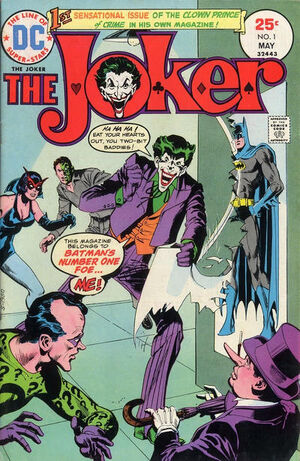
Comics: Where did I put that copy of Joker#1?

One of the main problems I'm having is that, with 10,000 comics stored in about 30+ boxes, I just can't find anything. In general, the stuff I packed up prior to moving off to college in 1984 is actually in pretty good shape. Comics are boarded and bagged and alphabetized from A-Z (roughly Alpha Flight to Zot!). But after that, things begin to get a bit chaotic.

Even back in the early 1980s and 1990s, I was buying about 30+ comics a month. And sometimes significantly more than that. When I was single and had a good job and a low car payment and rent? Fergitaboutit! I was hauling in danged near 50 comics a month for quite a few years. Funny how marriage and a mortgage cuts into your buying power, eh? And no, I don't regret it a bit! :-)

But during these days, I didn't take the time to board and bag everything, and I certainly wasn't spending the time to go back and reshuffle things to insert new issues into the old alphabetized collection. This meant that I was just kind of putting comics together by title and general time period. For example, X-Men wound up next to X-Force from the same year, but if the box I was putting them in got filled up, I just moved on to a new box and continued putting them in there. So, about five years of various X-Titles are scattered through three long boxes. Along with lots of other stuff, naturally.

This caused a big problem whenever I might want to find something that had been put away. For example, there was the time I wanted to sell my copy of JOKER #1.

The Joke's on me!
Back in 2008 when they released the movie, The Dark Knight, Heath Ledger's portrayal of the Joker was setting fire to everyone's imagination. It was an amazing performance and rightly earned  an Oscar for it. At that time, interest in the Joker had bumped up the price of any early comics featuring the Clown Prince of Crime.  I happened to have The Joker #1 and #2 from his short-lived series from 1975. The comic, which normally sold for about $5-$7 on ebay had climbed north of $40. I reckoned that I could easily get $50 for the pair.

My plan was simple: I would sell the comic now at a higher price and then, later, when the price came back down, I would rebuy it. You see, movies and TV shows do not seem to have a permanent effect on comic prices. The interest they generate is artificial and any price spikes you see will almost certainly be temporary.


I went to my storage facility (that's where the books were at the time) and I moved all the boxes around so I could get to the J-M Longbox... and it wasn't in there! I cracked open the B box in the off chance I had stored it with Batman... and it wasn't there, either. So, there I was, with thousands of comics, and I couldn't find the two I was looking for. The movie passed, the price peaked, and the price of the comic has gone back down to about $10-$15, depending on condition.

By the way, I finally did find the book. Apparently I had moved it in with some miscellaneous Batman titles (Catwoman, Birds of Prey, etc.). So that leaves me with the another aspect of the problem I'm facing: It's not just about keeping my comics stored and safe from moisture and damage, it's about putting them into a system of organization that will let me find what I want when I want.

And for that, I've decided to turn to software.

Comic Talk continues on Wed. when I tell about my search for the "perfect" comic book database.
Netflix Friday continues with a surprising find that was much better than I expected it to be.